What Is Linux ?

A DevOps engineer with a knack for Automation and a proven track record in maintaining and administering DevOps process
Linux is an operating system, just like Windows or macOS, that runs on computers and other devices.
What makes Linux special is that it is free and open-source, which means that anyone can use it and even modify its code to suit their needs.
Linux is known for its stability, security, and flexibility.
What are the flavours in linux ?
In the context of Linux, "flavors" refer to different distributions or variations of the operating system.
Who created them ?
These distributions are created by various organizations or communities, and they typically include the Linux kernel (the core of the operating system) along with a selection of software, tools, and desktop environments to provide a complete user experience.
Which flavour is most famous and most widely used ?
Some of the most famous and widely used Linux distributions include:
Ubuntu: Ubuntu is one of the most popular Linux distributions, known for its user-friendly interface and extensive community support. It is based on Debian and offers a range of editions for different use cases, including desktop, server, and cloud.
Fedora: Fedora is a community-driven distribution sponsored by Red Hat. It focuses on bringing the latest open-source technologies to users and serves as a testbed for Red Hat Enterprise Linux. It is known for its commitment to innovation and its strong support for software developers.

Debian: Debian is one of the oldest and most influential Linux distributions. It is known for its stability, security, and adherence to the principles of free and open-source software. Many other distributions, including Ubuntu, are based on Debian.
CentOS: CentOS (Community Enterprise Operating System) is a distribution based on the source code of Red Hat Enterprise Linux (RHEL). It aims to provide a free and open-source alternative to RHEL with long-term support and stability, making it popular for server environments.
Arch Linux: Arch Linux is a lightweight and highly customizable distribution. It follows a rolling release model, meaning that users receive continuous updates rather than having to install major releases. Arch Linux is favored by advanced users who prefer to build their own customized system.
Linux Mint: Linux Mint is a distribution based on Ubuntu that aims to provide a user-friendly and familiar experience for Windows users transitioning to Linux. It includes popular desktop environments such as Cinnamon and MATE and focuses on simplicity and ease of use.
openSUSE: openSUSE is a community-driven distribution known for its stability and flexibility. It offers two main editions, Leap (based on SUSE Linux Enterprise) and Tumbleweed (a rolling release version), and supports multiple desktop environments.
Manjaro: Manjaro is a user-friendly distribution based on Arch Linux. It aims to provide an easy-to-use and intuitive experience for both beginners and experienced users. Manjaro also offers multiple desktop environments to choose from.
Kali Linux: Kali Linux is a specialized distribution focused on cybersecurity and penetration testing. It includes a wide range of security tools and is commonly used by professionals and enthusiasts in the field of cybersecurity.
Families in Linux distributions
Debian Family: Debian → Ubuntu, Linux Mint, etc.
Description: Debian-based distributions are known for stability, wide hardware support, and using the APT package manager.
Red Hat Family: Red Hat Enterprise Linux (RHEL) → CentOS, Fedora, etc. Description: Red Hat-based distributions are known for strong enterprise support, focus on security, and using the RPM package manager.
LET'S DO PRACTICAL NOW
I am using AWS server (Instance ) here you can use Virtual box and Centos.iso image.
Basic linux commands
Listing commands
ls option_flag arguments --> list the sub directories and files avaiable in the present directory

Examples:
ls -l--> list the files and directories in long list format with extra information
content permissions
number of links to the content
owner of the content
group owner of the content
size of the content in bytes
last modified date / time of the content
file or directory name
ls -a--> list all including hidden files and directory

Type the ls -a command to list files or directories including hidden files or directories. In Linux, anything that begins with a . is considered a hidden file.
ls *.sh--> list all the files having .sh extension.

ls -i--> list the files and directories with index numbers inodes.
ls -d */--> list only directories.(we can also specify a pattern)Type the ls -d */ command to list only directories.

Directoy commands
pwd--> print work directory. Gives the present working directory.cd path_to_directory--> change directory to the provided pathcd ~or justcd--> change directory to the home directorycd ---> Go to the last working directory.cd ..--> change directory to one step back.cd ../..--> Change directory to 2 levels back.mkdir directoryName--> to make a directory in a specific location
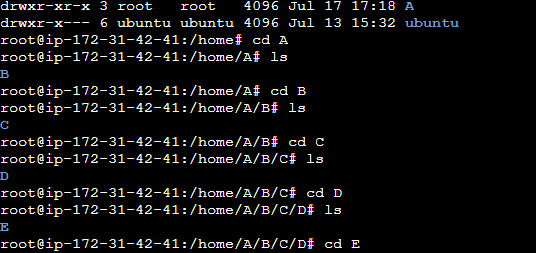
Examples:
mkdir newFolder              # make a new folder 'newFolder'

mkdir .NewFolder              # make a hidden directory (also . before a file to make it hidden)

mkdir A B C D                  #make multiple directories at the same time

mkdir /home/user/Mydirectory   # make a new folder in a specific location

mkdir -p  A/B/C/D              # make a nested directory

